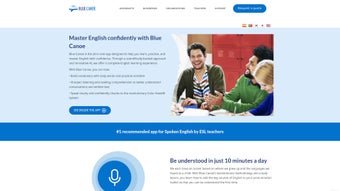

Download Blue Canoe Learning – AI‑Powered English Pronunciation Tool, Free & Secure
Introduction
Mastering English pronunciation has long been a stumbling block for millions of learners around the globe. Traditional classroom drills, costly private tutors, and generic language apps often fail to address the nuanced combination of visual, auditory, and kinesthetic cues that the human brain needs to rewire speech patterns. Blue Canoe Learning enters this space with a fresh, scientifically‑backed approach that leverages artificial intelligence, the Color Vowel System, and brain‑science‑derived exercises to create a truly immersive learning environment.
The platform is built to be accessible to anyone with an internet connection, offering a free core version that delivers powerful feedback without hidden fees. Whether you are a business professional preparing for a high‑stakes presentation, a student aiming for a higher IELTS score, or simply an enthusiast who wants to speak English with confidence, this tool promises a structured, data‑driven path toward clearer speech. In the sections that follow, we will explore the core philosophy behind the app, dive into its most compelling features, walk through the step‑by‑step usage process, and answer the most common questions prospective users tend to ask.
Overview
Blue Canoe Learning is an AI‑driven web application that targets one of the most challenging aspects of mastering English – pronunciation. By blending the scientifically‑validated Color Vowel System with cutting‑edge brain‑science principles, the platform creates a learning environment that feels both natural and highly effective. Whether you are a non‑native professional preparing for presentations, a university student aiming for higher IELTS scores, or simply a language enthusiast who wants to speak with confidence, Blue Canoe Learning offers a structured path to clearer speech.
The core of the system revolves around real‑time visual, auditory, and kinesthetic feedback, allowing users to instantly hear and see the difference between their current articulation and the target native‑like sound. In addition to the foundational drills, the app enriches the experience with interactive games, progress dashboards, and personalized lesson plans that adapt to each learner’s pace. This holistic approach not only reduces accent but also reinforces rhythm, intonation, and stress patterns essential for fluent communication.
The result is a comprehensive, engaging, and scientifically grounded tool that empowers users to transform their spoken English from hesitant to confident, all within a secure, browser‑based environment that respects privacy and offers regular updates.
Key Features
Blue Canoe Learning’s feature set is built around three pillars: immediate, actionable feedback; adaptive, multisensory learning; and seamless, cloud‑based progress tracking. Each pillar is reflected in a collection of tools that together form a robust pronunciation training suite. Below is a deeper look at what you can expect when you start using the platform.
- AI‑Generated Real‑Time Feedback: Instantly visualizes vowel colors and pitch contours, highlighting errors as you speak.
- Color Vowel System Integration: Uses a unique visual coding of vowel sounds to simplify auditory discrimination.
- Brain‑Science Based Exercises: Activities designed to stimulate the neural pathways responsible for speech motor control.
- Interactive Pronunciation Games: Gamified drills that keep motivation high while reinforcing correct articulation.
- Progress Tracking Dashboard: Detailed analytics showing improvement trends, streaks, and areas needing extra practice.
- Adaptive Learning Paths: Lesson plans automatically adjust difficulty based on user performance.
- Multisensory Learning Modes: Supports visual, auditory, and kinesthetic learners through synchronized cues.
- Secure Cloud Sync: All data is encrypted and saved to the cloud, allowing seamless access from any device.
- Regular Content Updates: New exercises, games, and accent modules are added monthly.
- Free Core Version: Full access to essential pronunciation tools without any hidden fees.
The AI engine behind the feedback uses deep‑learning models trained on thousands of native‑speaker recordings, ensuring that the color‑coded suggestions are both precise and pedagogically sound. The Color Vowel System transforms abstract phonetic concepts into an intuitive palette, enabling learners to “see” their mistakes in a way that traditional audio‑only tools cannot. Gamification elements such as time‑bound challenges, leaderboards, and reward badges further increase engagement, making daily practice feel less like a chore and more like a rewarding game. Finally, the secure cloud infrastructure guarantees that progress data is safely stored, encrypted, and readily available across all devices, eliminating the need for manual backups or local installations.
Installation & Usage Instructions
Getting Started – No Download Required
Because Blue Canoe Learning is a fully browser‑based solution, there is no need to download or install any software on your computer or mobile device. To begin, open a modern web browser (Chrome, Edge, Firefox, or Safari) and navigate to the official website. Click “Sign Up,” enter a valid email address, and confirm the account through the verification link you receive. After logging in, the onboarding wizard will ask a few simple questions about your current proficiency, accent goals, and preferred learning style. This information helps the AI generate a customized practice schedule that aligns with your personal objectives.
Device Compatibility (Windows, macOS, Android, iOS – any modern browser)
Since the platform runs entirely in the cloud, it works on virtually any operating system that supports up‑to‑date browsers. Whether you are on a Windows desktop, a macOS laptop, an Android tablet, or an iPhone, you will experience the same responsive design and feature set. For optimal audio capture, we recommend using a headset with a built‑in microphone; however, the built‑in mic on most laptops and smartphones is sufficient for basic practice. The application automatically adjusts its layout to match the screen size, ensuring a smooth experience on both large monitors and small mobile screens.
Step‑by‑Step Usage Guide
- Log In: Enter your credentials and access the main dashboard.
- Select a Module: Choose from “Vowel Colors,” “Rhythm & Stress,” or “Game Zone.”
- Record Your Voice: Click the microphone icon, speak the prompted word or phrase, and watch the AI render color‑coded feedback.
- Review & Repeat: The system highlights mismatched vowel colors and suggests corrective mouth positions; repeat until the feedback turns green.
- Track Progress: Visit the “My Stats” page to view charts of accuracy, speed, and consistency over time.
Pros and Cons
- Pros:
- Highly accurate AI feedback reduces the need for a human tutor.
- Free core version provides extensive practice without a subscription.
- Multisensory approach suits a wide range of learning preferences.
- Cloud‑based progress tracking enables learning on any device.
- Regular content updates keep the curriculum fresh and relevant.
- Cons:
- Advanced premium modules (e.g., business‑specific accents) require a paid upgrade.
- Internet connection is mandatory; offline use is not currently supported.
- Users with low‑quality microphones may experience less precise feedback.
- Some learners may need an initial tutorial to fully understand the Color Vowel System.
Expert Review
Blue Canoe Learning delivers a compelling blend of AI technology and proven linguistic methodology. The real‑time, color‑coded feedback is a game‑changer for visual learners, while the adaptive lesson paths keep the experience challenging yet achievable. The free tier is generous enough to provide real value, and the optional premium add‑ons are well‑priced for professionals seeking industry‑specific accent training. The main drawback is the reliance on a stable internet connection, which can be a limitation for users in regions with spotty connectivity. Overall, the platform earns high marks for innovation, usability, and educational impact.
Jordan Patel
FAQ & Conclusion
Is Blue Canoe Learning really free?
Yes, the core version that includes all fundamental pronunciation drills, the Color Vowel System, and progress tracking is completely free. Optional premium add‑ons, such as industry‑specific accent modules, are available for a subscription fee.
Do I need a powerful computer to run the app?
No. Because Blue Canoe Learning is browser‑based, any device that can run a modern web browser (Chrome, Edge, Firefox, Safari) will work smoothly. Even older laptops and smartphones handle the audio processing without issues.
How does the Color Vowel System help my accent?
The system assigns distinct colors to each vowel sound, turning abstract phonetics into a visual cue. When you speak, the AI maps your vowel production onto these colors, instantly showing mismatches. This visual reinforcement accelerates the brain’s ability to differentiate and reproduce native‑like vowel shapes.
Can I track my improvement over time?
Absolutely. The “My Stats” dashboard logs accuracy percentages, speed, and streaks for each exercise. You can export the data as a CSV file or view detailed graphs that illustrate your learning curve.
Is my personal data safe?
Blue Canoe Learning uses end‑to‑end encryption for all stored data and complies with GDPR standards. Audio recordings are processed in real time and are not permanently saved unless you explicitly choose to keep them for later review.
In summary, Blue Canoe Learning stands out as a powerful, AI‑enhanced solution for anyone serious about refining English pronunciation. Its blend of scientific methodology, engaging gamification, and zero‑cost entry makes it an attractive choice for learners across skill levels. By providing instant, color‑coded feedback and a flexible, cloud‑based platform, the app removes many of the traditional barriers to accent reduction, such as the need for expensive tutors or rigid classroom schedules. If you are ready to speak with greater clarity and confidence, download Blue Canoe Learning today, create your free account, and start your journey toward a more natural‑sounding English voice.



.png)



